2026-06-11
Cloud Based Productivity and Collaboration Tools: A Practical Stack for Remote Teams in 2026

Cloud based productivity and collaboration tools are easy to buy and surprisingly hard to operate.
A remote team can have shared docs, chat, tickets, video calls, design files, repositories, and dashboards, then still lose an afternoon because nobody can see the same thing at the same time. The UI looks modern. The workflow is still broken.
Teams think the problem is choosing the best app. The real problem is designing the operating layer that connects async work, live collaboration, remote control, decisions, permissions, and follow-up.
That changes the conversation. The practical question is not which cloud tool has the longest feature checklist. It is whether your team can move from issue to shared context to action without asking five people to repeat what happened.
Table of contents
- Why cloud based productivity and collaboration tools fail in real teams
- The collaboration stack: layers, not apps
- Screen sharing is the operational control plane
- A practical workflow for choosing cloud based productivity and collaboration tools
- What works: rules for a remote team collaboration stack
- What fails in practice
- Implementation sequence for remote teams in 2026
- Metrics that tell you the stack is healthy
- Product fit: where PairUX belongs in the stack
- Closing: cloud based productivity and collaboration tools as an operating system
Why cloud based productivity and collaboration tools fail in real teams
Tool choice is not the hard part
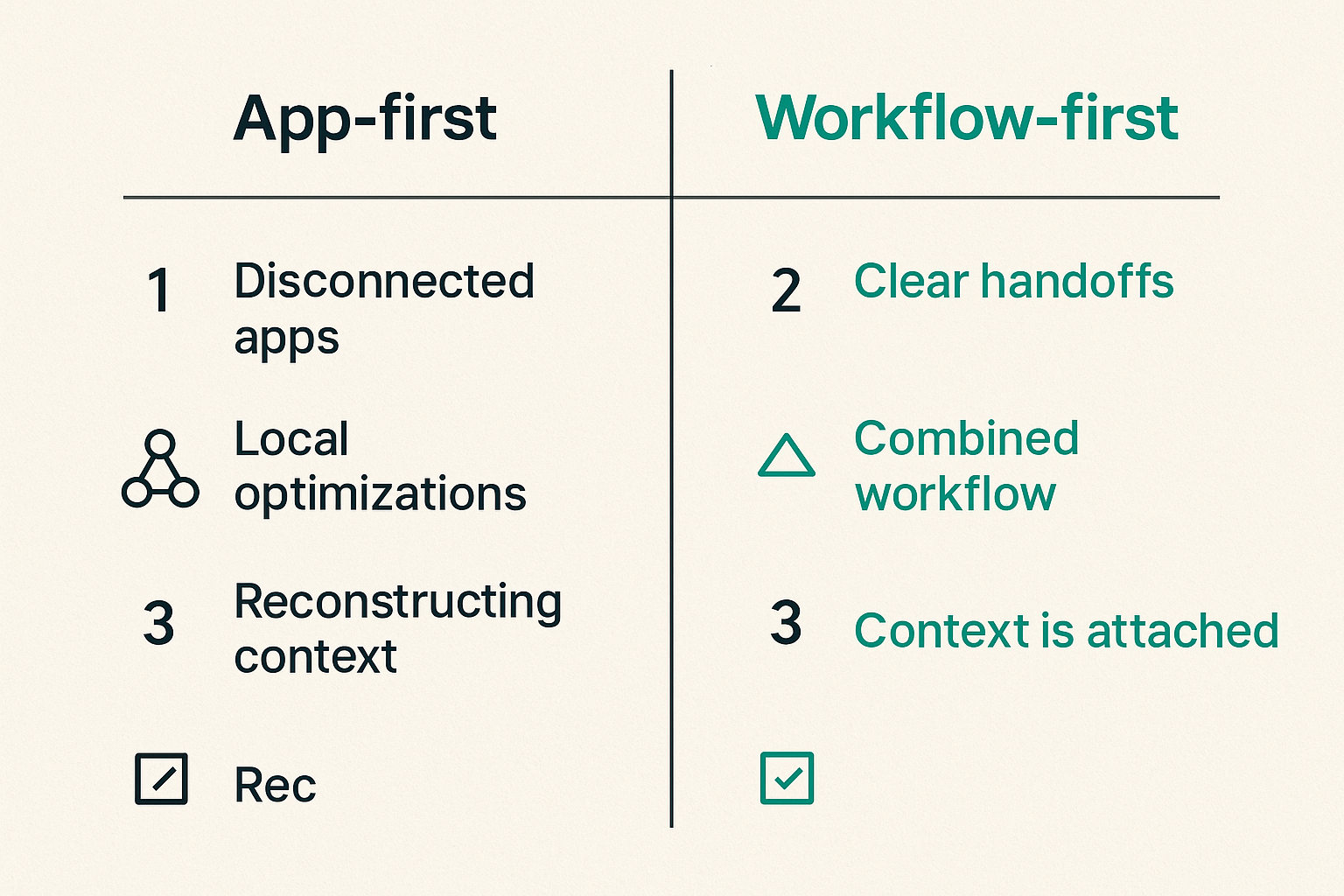
Most remote teams already have enough software. They have a document tool, a project tracker, a chat system, a video meeting tool, a design workspace, a code host, and a password manager. If the team is technical, there are also preview environments, observability dashboards, incident channels, and deployment systems.
The mistake teams make is treating each tool as a separate procurement decision. A designer asks for one platform. Engineers standardize on another. Operators bring in a ticketing system. Customer support adds a knowledge base. Each decision makes sense locally. The combined workflow becomes fragile.
A useful way to think about it is this: productivity tools create places where work can happen. Collaboration architecture defines how work moves between those places.
Without that architecture, people spend too much time reconstructing context. A pull request links to a ticket, but the design comment is somewhere else. A customer bug is discussed in chat, but the actual screen state was never captured. A founder gives direction in a call, but the decision is not attached to the work item.
Async work creates hidden handoff debt
Async collaboration is necessary for distributed teams. It is also where handoff debt accumulates.
Every async handoff asks the next person to rebuild state: what was tried, what failed, what is blocked, what changed, and what decision is needed. Docs help. Tickets help. Recordings help. None of them fully replace being in the same working context.
The practical question is where your team draws the line between async explanation and live resolution. If every issue becomes a meeting, the team is slow. If every issue stays async, complex work stalls. Healthy teams have a fast escalation path: write it down, attempt async resolution, then jump into a live working session when the cost of explanation exceeds the cost of shared control.
Practical rule: If two async replies do not create forward movement, switch to a live working session before the thread becomes a second project.
The architecture question
The question is not whether cloud tools are good or bad. The question is whether they form an operator-friendly system.
A remote collaboration stack should answer five questions quickly:
- Where is the source of truth?
- Who owns the next action?
- How do people get shared visual context?
- Who can take control, and under what conditions?
- Where does the decision get recorded after the session?
If those questions are unclear, the team will compensate with more meetings, more messages, and more status updates. That is not collaboration. That is workflow tax.
The collaboration stack: layers, not apps
System of record layer
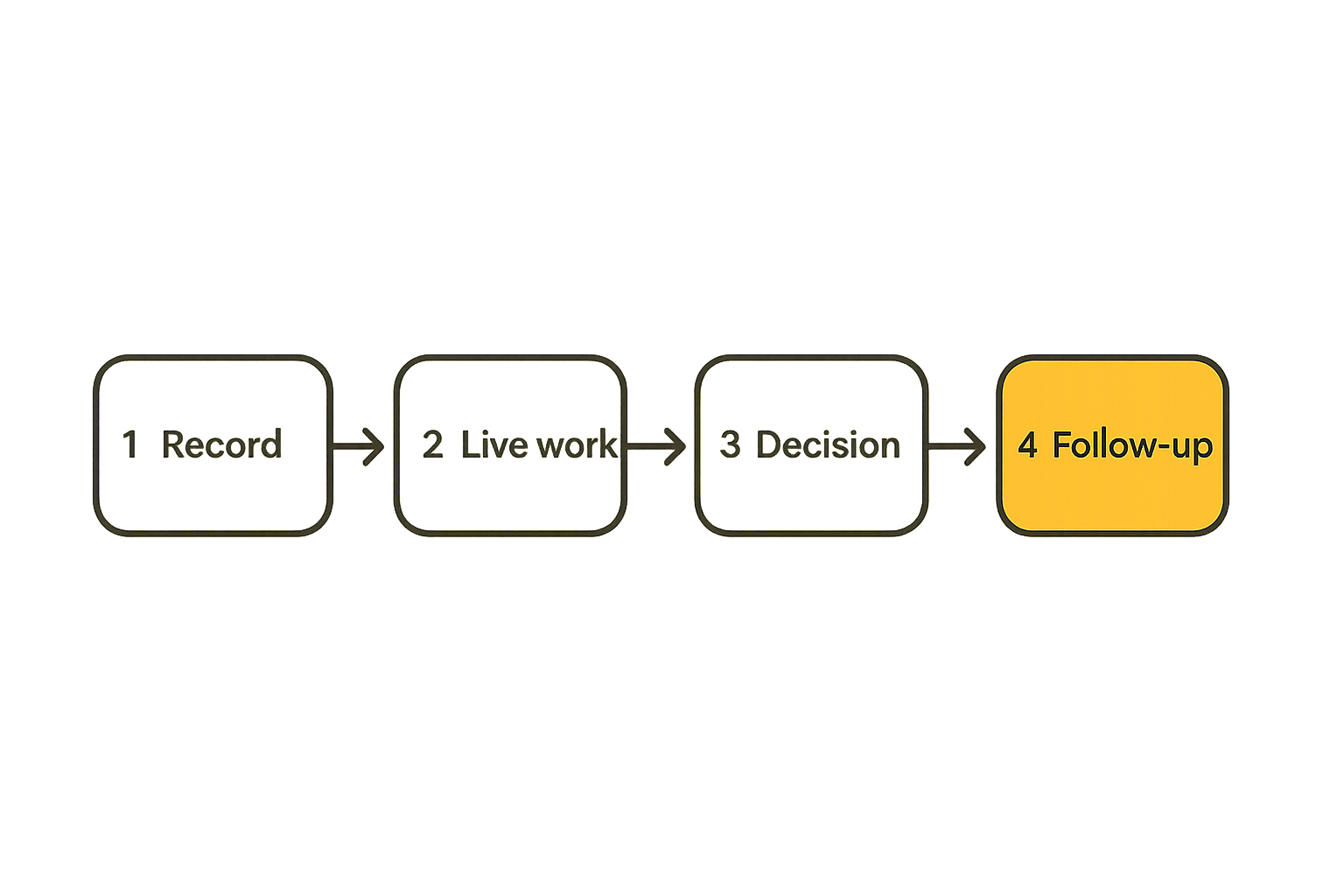
The system of record is where durable truth lives. For product teams, this is usually a mix of project tracking, documentation, design files, code repositories, and customer context. The exact tools matter less than the rule for what belongs where.
A simple model works better than a complex taxonomy:
| Layer | Job | Examples of content | Failure mode |
|---|---|---|---|
| System of record | Durable truth | Requirements, tickets, decisions, links | People cannot find the latest answer |
| Working session | Live problem solving | Screen share, remote control, co-debugging | People talk around the issue |
| Communication | Coordination | Announcements, questions, availability | Chat becomes the source of truth |
| Follow-up | Closure | Action items, owners, status | Live sessions create no durable outcome |
The system of record should not try to contain every conversation. It should contain the useful output of conversations. That distinction matters. If every comment, recording, draft, and tangent becomes official, nobody trusts the official record.
Working session layer
The working session layer is where the work gets unstuck. This is where screen sharing, remote control, multi-cursor collaboration, pair design, pair programming, QA reproduction, and operator troubleshooting live.
This layer is often under-designed. Teams assume video calls are enough. They are not. A video call lets people talk. A working session lets people operate together.
What breaks in practice is the gap between seeing and doing. Someone shares a screen, another person says click there, the first person clicks the wrong target, then the group spends ten minutes narrating actions that one person could have performed in ten seconds. For high-context work, remote control is not a convenience feature. It is a workflow primitive.
Related reading from our network: engineering leaders dealing with similar workflow design choices may find the hiring and role-design angle in Software Engineer Jobs in 2026 useful when separating tool problems from ownership problems.
Decision and follow up layer
Live collaboration creates value only if it produces closure. The follow-up layer turns shared work into durable action.
After a session, the team should know:
- What changed?
- What decision was made?
- What remains unresolved?
- Who owns the next step?
- Where is the artifact or link?
This does not require heavy process. It requires a habit. The final two minutes of a working session should update the ticket, doc, design comment, or commit reference. If the decision lives only in the memory of the people who attended, the session created a future interruption.
Screen sharing is the operational control plane
Watching is different from working
Screen sharing looks simple, so teams underestimate it. In practice, it is the control plane for remote work. It is where visual state, application state, human intent, and permission meet.
Watching is passive. Working is active. If a designer is reviewing a prototype, passive viewing may be enough. If a developer is debugging a local environment with another developer, passive viewing is usually too slow. If support is helping a teammate reproduce a workflow, remote control may be the fastest path to truth.
The stack should make those modes explicit. View-only sessions are good for reviews. Shared control is good for paired execution. Temporary control is good for support. Persistent unattended access is a different category and needs stronger controls.
Remote control changes ownership
Remote control changes the question from can you see my screen to can you safely act in my environment. That is a serious boundary.
Good remote control tools make control visible, revocable, and intentional. The person sharing should know who has control. The person taking control should know what scope they have. Both sides should be able to stop the session quickly.
Practical rule: Remote control should be granted like production access: intentionally, temporarily, visibly, and only for the work at hand.
This is why collaborative screen sharing belongs in the architecture conversation. It touches security, support, onboarding, debugging, design review, and customer-facing operations. It is not just a meeting feature.
Presence should be explicit
Presence is more than an online dot. In live work, presence means knowing who is viewing, who is controlling, who is waiting, and who owns the current step.
Multi-cursor interaction can help because it reduces verbal overhead. Instead of saying the small button above the sidebar, a teammate can point, click, or take a turn. This is especially useful for product designers, frontend developers, QA testers, and startup operators who constantly move between UI state and decision-making.
PairUX focuses on this live collaboration layer. Teams evaluating features such as real-time screen sharing, remote control, and multi-cursor work can review the current PairUX collaboration features in the context of this broader stack decision.
A practical workflow for choosing cloud based productivity and collaboration tools
Start with the work modes
Do not start with vendor lists. Start with the modes of work your team actually performs.
Common modes include:
- Async planning: specs, tickets, roadmaps, design notes.
- Live review: design critique, sprint planning, roadmap review.
- Live execution: pair programming, debugging, QA reproduction, customer support.
- Decision capture: final direction, accepted tradeoff, owner assignment.
- Follow-up: status update, pull request, release note, support response.
For each mode, identify the primary tool, the handoff target, and the failure pattern. This exposes gaps quickly. Many teams discover they have several tools for discussion and almost no reliable path for live execution.
Map trust boundaries
Cloud collaboration tools cross trust boundaries constantly. A session may expose code, customer data, credentials, internal dashboards, unreleased designs, or admin panels. The security model cannot be an afterthought.
Map the boundaries before rollout:
- Internal employee to internal employee.
- Contractor to internal employee.
- Support team to customer environment.
- Founder to finance or admin systems.
- Developer to production diagnostics.
Each boundary needs a control pattern. View-only may be enough for some. Remote control may be allowed for others. Recording may be prohibited in sensitive workflows. Access logs may be required for regulated teams.
Related reading from our network: teams building local AI or agent workflows face similar permission and credential boundaries, which are explored in Mac Tools for AI Agent Builders.
Define the minimum viable stack
The minimum viable collaboration stack is not the smallest number of tools. It is the smallest number of handoffs that reliably move work to completion.
A practical baseline for remote product teams looks like this:
- Documentation for durable context.
- Ticketing or project tracking for ownership.
- Chat for lightweight coordination.
- Video or live sessions for discussion.
- Collaborative screen sharing with remote control for execution.
- Repository or design system for artifacts.
- Changelog or release notes for what shipped.
The important part is not the list. The important part is the path between the list. If a bug starts in chat, it should become a ticket. If the ticket requires shared reproduction, it should move into a live session. If the live session finds the cause, the result should return to the ticket or pull request.
What works: rules for a remote team collaboration stack
One home for truth
Every team needs one default place for truth by work type. Product requirements belong somewhere. Engineering work belongs somewhere. Design decisions belong somewhere. Customer issues belong somewhere.
The mistake teams make is letting chat become the archive. Chat is useful because it is fast. It is dangerous because it feels complete while being hard to audit later. Search helps, but search is not architecture.
Practical rule: Chat can start work, but it should not be the final resting place for decisions, owners, or operational instructions.
A good rule is simple: if the information changes what someone should do later, put it in the system of record.
Fast path for live work
Remote teams need a fast path from confusion to shared context. This path should be socially normal and technically easy.
For example:
- A developer posts a blocking issue in the project channel.
- Another teammate asks one clarifying question.
- If the answer is still ambiguous, they start a screen sharing session.
- The blocker is reproduced or narrowed down live.
- The conclusion is written back to the ticket.
This sequence should not feel like scheduling a formal meeting. It should feel like pulling a teammate over to your desk.
Clear access and audit defaults
Access defaults shape behavior. If sharing is painful, people avoid it. If sharing is too permissive, teams create risk.
Use defaults that match the sensitivity of the work:
| Workflow | Default mode | Extra control |
|---|---|---|
| Design review | View and annotate | Guest limits for external review |
| Pair programming | Shared control | Explicit control handoff |
| QA reproduction | View or control | Session notes linked to ticket |
| Support troubleshooting | View first | Approval before control |
| Admin operations | View-only unless approved | Logging and short sessions |
The goal is not to slow everyone down. It is to make safe behavior the easy behavior.
What fails in practice
Tool sprawl without ownership
Tool sprawl is not just having many apps. It is having many apps with no owner for the workflow between them.
A common pattern looks like this: product uses one tool for roadmap planning, design uses another for comments, engineering uses tickets, founders use chat, and support uses a help desk. Each group optimizes locally. Cross-functional work becomes a scavenger hunt.
The fix is not always consolidation. Sometimes the right tools are already in place. The missing piece is ownership. Someone needs to define how work moves from intake to live session to artifact to shipped outcome.
Notification systems pretending to be workflow
Notifications are signals. They are not workflow.
A Slack ping, email alert, mention, or app badge can tell someone that something happened. It cannot guarantee that the right person understood the context, accepted ownership, performed the action, and closed the loop.
What breaks in practice is that teams use notification volume as a substitute for process clarity. More pings create more awareness but not necessarily more completion. Eventually, people mute channels and the system becomes less reliable than before.
A healthier approach is to define escalation paths. If a request is informational, it can stay async. If it needs ownership, it becomes a tracked item. If it needs shared context, it becomes a live session. If it needs approval, the decision is recorded.
Security added after adoption
The worst time to design access control is after the team has already normalized unsafe shortcuts.
Remote collaboration tools often start as small team conveniences. Then contractors join. Then customer support uses them. Then sensitive dashboards appear in sessions. Then someone asks what was shared, who had control, and whether a recording exists.
Security does not need to be heavy. It does need to be explicit. At minimum, define who can start sessions, who can invite external users, when remote control is allowed, whether recordings are permitted, and where session notes go.
For teams rolling out PairUX, installation guidance, security notes, and setup details should be checked in the PairUX documentation before the tool becomes part of everyday operations.
Implementation sequence for remote teams in 2026
Phase 1 inventory the current stack
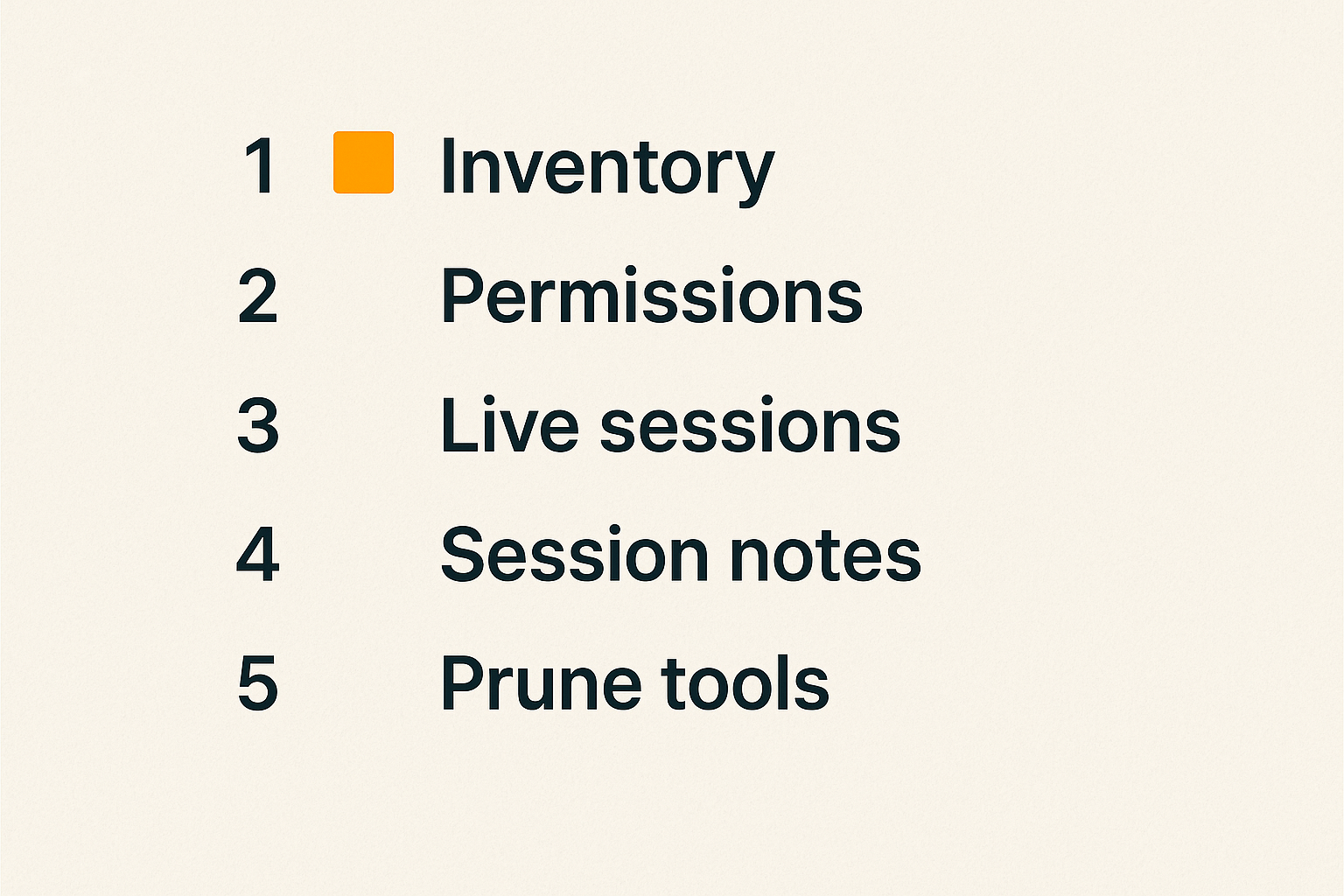
Start with a one-page inventory. Do not make this a three-week audit.
Capture:
- Tool name.
- Primary owner.
- Work mode it supports.
- Data sensitivity.
- Main handoff in and out.
- Biggest failure mode.
Then interview a few people who actually do the work. Ask where they lose time. Ask which tool they distrust. Ask where decisions disappear. Ask which tasks require too much narration.
You will usually find that the pain is not evenly distributed. A few handoffs cause most of the friction: bug reproduction, design-to-engineering review, support escalation, onboarding, or production troubleshooting.
Phase 2 standardize live collaboration
Once the painful handoffs are visible, standardize the live collaboration pattern.
A useful operating sequence:
- Define which workflows qualify for live collaboration.
- Set default session permissions for each workflow.
- Choose the tool used for screen sharing and remote control.
- Create a short naming convention for sessions or notes.
- Require a closing update in the system of record.
- Review the pattern after two weeks and remove friction.
This is intentionally lightweight. The goal is not ceremony. The goal is repeatability.
For example, a bug reproduction session might end with a ticket comment that includes environment, steps reproduced, suspected cause, owner, and next action. A design review might end with a decision summary and link to the updated frame. A pair programming session might end with a branch link and open question.
Phase 3 measure and prune
After the workflow is live, prune. Remote teams often keep tools because removing them feels risky. But unused or overlapping tools create cognitive load.
Look for tools that do one of three things:
- Duplicate a workflow already handled elsewhere.
- Create a dead-end artifact nobody reviews.
- Require manual copying into another system.
Pruning is not just cost control. It improves reliability. When people know where work starts, where live collaboration happens, and where decisions land, they spend less time negotiating process.
Related reading from our network: launch teams in very different markets run into similar catalog, trust, and support loops, and Amway Products as a Launch Architecture is a useful adjacent comparison for operators thinking about workflow systems rather than isolated assets.
Metrics that tell you the stack is healthy
Time to shared context
Time to shared context measures how long it takes for the right people to see the same problem clearly. This is often more useful than counting meetings or messages.
For a support issue, shared context may mean reproducing the customer state. For a design issue, it may mean everyone looking at the same interaction. For an engineering blocker, it may mean one teammate seeing the local error, code path, and logs together.
You do not need perfect instrumentation. Sample a few incidents or blockers each week. Ask how long it took to get everyone into the same context. If the answer is usually hours or days, your collaboration stack is leaking time.
Handoff completion rate
A handoff is complete when the next owner can act without going back for basic context.
Low handoff completion looks like repeated questions, reopened tickets, ambiguous comments, and live sessions that start by reconstructing history. High completion looks like clear owner, clear artifact, clear next step, and enough context to continue.
Track a small number of handoff types:
| Handoff | Healthy signal | Unhealthy signal |
|---|---|---|
| Design to engineering | Ticket links to final design and decision | Engineers ask which version is current |
| Support to product | Repro steps and impact are clear | Product asks support to restate the case |
| QA to engineering | Environment and expected result included | Developer cannot reproduce |
| Live session to ticket | Summary and owner added | Nobody knows what was decided |
This metric is not about blaming people. It is about finding the places where the system forces people to be translators.
Support load from collaboration failures
Some support load is actually collaboration failure in disguise. Internal support tickets, repeated onboarding questions, unclear permissions, meeting setup problems, and who has control confusion all indicate the stack is not self-explanatory.
Watch for recurring questions:
- Which tool should I use for this?
- Can you send the link again?
- Who has access?
- Where did we decide that?
- Can you just take control and show me?
If these questions repeat, document the workflow or change the default. Do not rely on tribal memory.
Product fit: where PairUX belongs in the stack
PairUX as a live work layer
PairUX fits in the working session layer: the place where remote teammates need to share screens, hand off control, point at the same interface, and solve a real problem together.
This is different from being the place for every document, ticket, or long-term artifact. PairUX is not trying to replace your project tracker or repository. It should connect to the moment where async context is no longer enough and the team needs to operate together.
That product boundary is important. Good collaboration stacks do not ask one tool to do everything. They ask each tool to do its job clearly and hand off cleanly.
When PairUX is a good fit
PairUX is a strong fit when the team regularly needs live visual context and shared control. Typical examples include:
- Product designers reviewing UI behavior with engineers.
- Developers pairing on local bugs or frontend issues.
- QA teams reproducing steps with product owners.
- Startup operators helping teammates through internal tools.
- Remote teams that want screen sharing to feel closer to working at the same desk.
If your team is evaluating this layer, the broader PairUX blog has more practical notes on remote collaboration workflows, including this related guide to cloud based productivity and collaboration tools as a remote team workflow architecture.
When PairUX is not enough
PairUX will not fix a broken system of record. It will not decide who owns a ticket. It will not replace good written context. It will not make unclear permissions magically safe.
That is the point of treating collaboration as architecture. A live work tool is powerful when it sits inside a workflow that knows when to use it and where the output goes.
If a team has no ticket ownership, no documentation habit, and no access policy, adding screen sharing may make the chaos more visible but not solve it. Fix the workflow path first, then use live collaboration to reduce the cost of shared context.
Closing: cloud based productivity and collaboration tools as an operating system
The operator view
Cloud based productivity and collaboration tools are not a shopping category. For remote teams, they are the operating system for how work moves.
The operator view is simple: reduce the number of times people have to restate context, shorten the path from confusion to shared action, and make decisions durable after the session ends.
That means your stack needs a source of truth, a live work layer, clear trust boundaries, and a follow-up habit. It also means being skeptical of tools that create more places to talk without improving the path to completion.
The teams that get this right do not necessarily have fewer tools. They have fewer ambiguous handoffs. That is the difference between a remote team that feels constantly busy and a remote team that can actually operate.
Try pairux.com
PairUX is for remote teams that need fast, practical collaborative screen sharing, remote control, and working together online. If your cloud based productivity and collaboration tools need a stronger live work layer, Try pairux.com.